Hello Folks, I am Nirmal Unagar
In this blog, I’ll walk through a set of PHP webshell detections I built using Microsoft Defender for Endpoint (MDE) advanced hunting — no Sentinel involved. Before jumping into the queries, I want to cover some background on how PHP actually runs on a server, because understanding that makes the detections much easier to follow. I’ll also call out where Windows and Linux differ, since a lot of PHP hosting runs on Linux and most public writeups only cover Windows/IIS.
Let’s get into it.
Why this matters Link to heading
PHP runs a huge share of the web, so a PHP webshell is one of the most common footholds after a file-upload bug, an RCE flaw, or a vulnerable plugin. The attacker drops a small script, calls it over HTTP, and the web server starts running OS commands for them.
That moment is the weak point. A web-facing process (IIS, Apache, PHP-FPM) suddenly creates a shell or a download tool as a child. Normal websites almost never do that. Everything below is built on that parent-child relationship, plus two supporting signals: where PHP files get written, and which servers run exposed PHP.
All queries use standard Defender XDR Advanced Hunting tables (DeviceProcessEvents, DeviceFileEvents, DeviceTvm*, DeviceInfo).
Step 1: How PHP Actually Runs on a Server Link to heading
The basic flow is: browser → web server → PHP → script runs → response. PHP code runs under a low-privilege identity (an IIS app pool or a service account on Windows, www-data/apache/nginx on Linux). What matters for detection is which process hosts PHP, because that process name becomes the parent of anything the script launches.
| Model | Where | How PHP runs | Process you see in MDE |
|---|---|---|---|
| mod_php | Apache (Linux & Windows) | PHP loaded inside the Apache process | apache2/httpd (Linux), httpd.exe (Windows) |
| FastCGI on IIS | Windows | IIS FastCGI module starts PHP workers | w3wp.exe then php-cgi.exe |
| PHP-FPM | Linux (Nginx/Apache) | Separate pool of PHP workers behind a socket | php-fpm, often versioned like php-fpm8.2 |
| CGI / LSAPI | Both / LiteSpeed | PHP launched per request or by LiteSpeed | php-cgi, lsphp |
| CLI | Both | Run from a terminal, cron, or scheduled task | php/php.exe |
I know, I know — Step 1 felt like a classroom lecture 😅 But now, let’s get our hands dirty. Two things that trip people up when writing these detections:
php-fpm.exedoes not exist. PHP-FPM is a Linux-only process model.- On Linux, FPM process names are often versioned (
php-fpm8.2), so match withstartswithinstead of an exact name.
Step 2: Windows vs Linux — Know the Differences Link to heading
| Windows | Linux | |
|---|---|---|
| PHP binaries | C:\php, C:\Program Files\PHP, C:\xampp\php | /usr/bin/php, /usr/sbin/php-fpm |
| Config | php.ini next to the PHP binaries | Per-SAPI: /etc/php/<ver>/{cli,fpm,apache2}/php.ini (Debian), /etc/php.ini + /etc/php-fpm.d/www.conf (RHEL) |
| Web roots | C:\inetpub\wwwroot, C:\xampp\htdocs, C:\wamp64\www | /var/www/html, /var/www/<site>, /srv/www |
| Runs as | IIS APPPOOL\<pool> or Apache service account | www-data (Debian/Ubuntu), apache/nginx (RHEL) |
| Temp / sessions | C:\Windows\Temp | /tmp, /var/lib/php/sessions |
| Shell PHP spawns | cmd.exe /c <command> | /bin/sh -c <command> |
| Process names | End in .exe | No extension; FPM names may be versioned |
| Typical post-exploit commands | whoami, systeminfo, net user, PowerShell, certutil | id, uname -a, curl/wget, bash, python |
Note: on Debian-style systems, php.ini differs per SAPI. Hardening the CLI config does nothing for the FPM or Apache config — a mistake I’ve seen more than once during assessments.
Step 3: How a PHP Webshell Becomes a Shell Link to heading
A webshell is just a PHP file that passes attacker input to something dangerous — system(), exec(), shell_exec(), passthru(), popen(), proc_open(), or backticks, often hidden behind eval() or base64_decode() to dodge file scanners.
When one of those functions runs, PHP asks the OS to create a child process. That child is what MDE records. The parent is whatever hosts PHP (w3wp.exe, php-cgi.exe, httpd.exe, apache2, php-fpm), and the child is cmd.exe or sh. Early commands are almost always recon (whoami, id, systeminfo, uname) followed by a download of a second-stage tool.
That gives us three angles to detect on:
- Process — a web or PHP process spawning a shell or download tool
- File — a web or PHP process writing new PHP files (the upload step) or executables/scripts (the staging step)
- Exposure — where outdated or internet-facing PHP exists in the first place
Step 4: Before You Run These Link to heading
- Replace the placeholder device names in
WebServerswith your own web servers — or better, match on a device tag/group. - Each query includes
DeviceIdandReportIdso you can turn it into a Defender XDR custom detection rule without edits. - Run each over 7–30 days first and tune before alerting. CMSs and frameworks legitimately write PHP files and sometimes call helper programs.
php.exe/phpis deliberately not treated as a web parent in the shell detections below, because CLI PHP under cron, Composer, and deployment scripts legitimately spawns shells. Hunt it separately if needed.
Step 5: The Queries Link to heading
Baseline first (hunting, not an alert) Link to heading
Before alerting on anything, learn what your web processes normally launch. Anything in the output you can’t explain is either a tuning exclusion or a finding.
let WebServers = dynamic(['web-srv-01', 'web-srv-02']);
let WebProcs = dynamic(['w3wp.exe','php-cgi.exe','php-win.exe','httpd.exe','apache.exe','nginx.exe','apache2','httpd','nginx','php-cgi','lsphp','litespeed']);
DeviceProcessEvents
| where Timestamp > ago(30d)
| where DeviceName has_any (WebServers)
| where InitiatingProcessFileName in~ (WebProcs) or InitiatingProcessFileName startswith 'php-fpm'
| summarize Executions = count(), FirstSeen = min(Timestamp), LastSeen = max(Timestamp) by InitiatingProcessFileName, FileName
| order by Executions desc
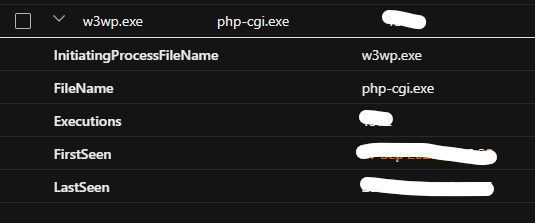
Running this on my own environment, the top row was w3wp.exe → php-cgi.exe with a high execution count and a wide FirstSeen–LastSeen spread. That’s expected and healthy — it’s exactly the IIS + FastCGI chain described in Step 1 (IIS spins up w3wp.exe, which hands requests to php-cgi.exe to actually run the PHP).
Seeing it here confirms two things:
The sensor is capturing this process chain correctly, so the shell detections downstream (Detection 1) will fire if something abnormal happens on top of it.
php-cgi.exeitself is not the thing to alert on — it runs constantly and legitimately. What you’re watching for isphp-cgi.exespawning something it shouldn’t, likecmd.exeorpowershell.exe, which is what Detection 1 checks next.
Detection 1: Windows web/PHP process spawns a shell or LOLBin Link to heading
This is the core PHP-to-shell signal on Windows. On IIS with PHP, the chain is w3wp.exe → php-cgi.exe → cmd.exe, and this catches the last hop. It also catches w3wp.exe spawning a shell from non-PHP webshells.
DownloadIndicator flags command lines that fetch something from the internet — that’s usually the step right after initial access, so treat those rows as highest priority.
let WebServers = dynamic(['win-web-01', 'win-web-02']);
let WebParents = dynamic(['w3wp.exe','php-cgi.exe','php-win.exe','httpd.exe','apache.exe','nginx.exe']);
let SuspiciousChildren = dynamic(['cmd.exe','powershell.exe','pwsh.exe','curl.exe','certutil.exe','bitsadmin.exe','whoami.exe','net.exe','net1.exe','nltest.exe','systeminfo.exe','mshta.exe','rundll32.exe','regsvr32.exe','wscript.exe','cscript.exe']);
DeviceProcessEvents
| where Timestamp > ago(7d)
| where DeviceName has_any (WebServers)
| where InitiatingProcessFileName in~ (WebParents)
| where FileName in~ (SuspiciousChildren)
| extend DownloadIndicator = ProcessCommandLine has_any ('http://', 'https://', 'Invoke-WebRequest', 'DownloadString', 'DownloadFile', 'Net.WebClient', '-urlcache', 'bitsadmin')
| project Timestamp, DeviceName, DeviceId, ReportId, InitiatingProcessFileName, InitiatingProcessCommandLine, InitiatingProcessAccountName, FileName, ProcessCommandLine, AccountName, DownloadIndicator
| order by DownloadIndicator desc, Timestamp desc
Tuning: exclude known maintenance jobs by exact parent + command line. Don’t exclude whole parents.
Detection 2: Linux web/PHP process spawns a shell or download tool Link to heading
Apache, Nginx, LiteSpeed, or PHP-FPM should not be starting sh, bash, curl, wget, or interpreters. PHP’s system() ends up as sh -c <command>, so the shell is usually the first thing you’ll see.
let WebServers = dynamic(['lnx-web-01', 'lnx-web-02']);
let WebParents = dynamic(['apache2','httpd','nginx','php-cgi','lsphp','litespeed']);
let SuspiciousChildren = dynamic(['sh','bash','dash','zsh','curl','wget','nc','ncat','socat','perl','whoami','id','uname']);
DeviceProcessEvents
| where Timestamp > ago(7d)
| where DeviceName has_any (WebServers)
| where InitiatingProcessFileName in~ (WebParents) or InitiatingProcessFileName startswith 'php-fpm'
| where FileName in~ (SuspiciousChildren) or FileName startswith 'python'
| where not(ProcessCommandLine has '/usr/sbin/sendmail -t')
| extend DownloadIndicator = ProcessCommandLine has_any ('http://', 'https://', 'curl ', 'wget ')
| project Timestamp, DeviceName, DeviceId, ReportId, InitiatingProcessFileName, InitiatingProcessCommandLine, InitiatingProcessAccountName, FileName, ProcessCommandLine, DownloadIndicator
| order by DownloadIndicator desc, Timestamp desc
Tuning: PHP’s mail() legitimately runs sh -c /usr/sbin/sendmail -t -i on many systems, so that exact pattern is excluded above. Keep exclusions narrow — an attacker can reuse that same text.
Detection 3: PHP file written by a web or PHP process Link to heading
Catches the upload step. Web processes serving pages should rarely create new PHP files — a .php file appearing in an uploads or temp folder is a classic webshell drop. Works for both Windows and Linux in one query.
let WebServers = dynamic(['web-srv-01', 'web-srv-02']);
let WebProcs = dynamic(['w3wp.exe','php-cgi.exe','php-win.exe','httpd.exe','apache.exe','nginx.exe','apache2','httpd','nginx','php-cgi','lsphp','litespeed']);
DeviceFileEvents
| where Timestamp > ago(7d)
| where DeviceName has_any (WebServers)
| where ActionType in ('FileCreated', 'FileModified', 'FileRenamed')
| where InitiatingProcessFileName in~ (WebProcs) or InitiatingProcessFileName startswith 'php-fpm'
| where FileName matches regex @'(?i)\.(php[0-9]?|phtml|phar)$'
| extend UserWritablePath = FolderPath has_any ('upload', 'uploads', 'images', 'media', 'files', 'tmp', 'temp')
| project Timestamp, DeviceName, DeviceId, ReportId, FolderPath, FileName, ActionType, UserWritablePath, InitiatingProcessFileName, InitiatingProcessCommandLine, InitiatingProcessAccountName
| order by UserWritablePath desc, Timestamp desc
Prioritise rows where UserWritablePath is true — a site has no legitimate reason to execute PHP from an uploads directory.
Tuning: WordPress updates, Composer, and Laravel compiled views all write PHP files. Baseline first, then exclude by folder.
Detection 4: Executable or script dropped by a web or PHP process Link to heading
Catches the staging step. Once an attacker has a shell, they usually bring tooling. A web or PHP process creating an executable, library, or script is almost never legitimate, on either OS.
let WebServers = dynamic(['web-srv-01', 'web-srv-02']);
let WebProcs = dynamic(['w3wp.exe','php-cgi.exe','php-win.exe','httpd.exe','apache.exe','nginx.exe','apache2','httpd','nginx','php-cgi','lsphp','litespeed']);
DeviceFileEvents
| where Timestamp > ago(7d)
| where DeviceName has_any (WebServers)
| where ActionType in ('FileCreated', 'FileRenamed')
| where InitiatingProcessFileName in~ (WebProcs) or InitiatingProcessFileName startswith 'php-fpm'
| where FileName matches regex @'(?i)\.(exe|dll|ps1|bat|cmd|vbs|hta|sh|pl|py|so)$'
| project Timestamp, DeviceName, DeviceId, ReportId, FolderPath, FileName, SHA256, InitiatingProcessFileName, InitiatingProcessCommandLine, InitiatingProcessAccountName
| order by Timestamp desc
Exposure 1: Where is PHP installed, and is the device internet-facing? Link to heading
Inventories PHP across the estate using Defender Vulnerability Management and flags internet-facing devices. Use this to scope where the detections above matter most.
DeviceTvmSoftwareInventory
| where SoftwareName contains 'php'
| join kind=leftouter (
    DeviceInfo
    | summarize arg_max(Timestamp, *) by DeviceId
    | project DeviceId, IsInternetFacing
  ) on DeviceId
| project DeviceName, OSPlatform, SoftwareName, SoftwareVersion, IsInternetFacing
| order by IsInternetFacing desc, DeviceName asc
Exposure 2: Known-vulnerable PHP Link to heading
Lists High and Critical CVEs against PHP, per device. Pair with Exposure 1 to patch internet-facing servers first.
DeviceTvmSoftwareVulnerabilities
| where SoftwareName contains 'php'
| where VulnerabilitySeverityLevel in ('Critical', 'High')
| summarize CveCount = dcount(CveId), CVEs = make_set(CveId, 20) by DeviceName, OSPlatform, SoftwareName, SoftwareVersion
| order by CveCount desc
Step 6: Test, Tune, Harden Link to heading
Test in a lab, not production. Drop a one-line script in a test web root, for example <?php system('whoami'); ?>, and browse to it. You should see Detection 3 fire for the file creation and Detection 1 or 2 fire for the child process. If neither fires, check sensor health before assuming the server is clean.
Tune by parent + command line, not by whole process. Excluding php-fpm or w3wp.exe entirely defeats the point.
Know the limits. MDE sees processes, files, and network activity — not HTTP requests or PHP source. A webshell that only reads files or dumps a database without spawning a process won’t trigger the process detections. Web server logs, a WAF, and file integrity monitoring fill that gap.
Hardening that makes these detections quieter and the attacker’s life harder:
- Set
disable_functionsinphp.iniforsystem,exec,shell_exec,passthru,popen, andproc_openif the application doesn’t need them. - Block PHP execution in uploads and media directories at the web server level.
- Run PHP under a dedicated low-privilege account with a restrictive
open_basedir. - Keep PHP patched and on a supported version.
Takeaway Link to heading
A web-facing process starting a shell, writing PHP into a folder it shouldn’t, or dropping executables is a high-signal pattern — and Defender for Endpoint gives you that telemetry on both Windows and Linux. Baseline first, tune narrowly, and alert on the rest.
So, Thank You For Your Time.