Over the last couple of days, I’ve been looking at how to hunt for PHP webshell activity using Microsoft Defender XDR Advanced Hunting. These are the queries I’ve put together based on the process and file activity I would investigate in Defender, without needing Sentinel. I’ll focus on Windows and Linux, because the process names and the activity worth looking for are different on each platform.
Why this matters Link to heading
PHP runs a huge share of the web, so a PHP webshell is one of the most common footholds after a file-upload bug, an RCE flaw, or a vulnerable plugin. The attacker drops a small script, calls it over HTTP, and the web server starts running OS commands for them.
That moment is the weak point. A web-facing process (IIS, Apache, PHP-FPM) suddenly creates a shell or a download tool as a child. Normal websites almost never do that. Everything below is built on that parent-child relationship, plus two supporting signals: where PHP files get written, and which servers run exposed PHP.
All queries use standard Defender XDR Advanced Hunting tables (DeviceProcessEvents, DeviceFileEvents, DeviceTvm*, DeviceInfo).
Windows vs Linux: what matters for detection Link to heading
The process that runs PHP matters because it helps establish which parent process to look for when PHP launches an operating-system command.
| Environment | Common web/PHP process names | What I would look for |
|---|---|---|
| Windows with IIS | w3wp.exe, php-cgi.exe | php-cgi.exe or the IIS worker spawning cmd.exe, PowerShell, or a download tool |
| Windows with Apache | httpd.exe | Apache spawning a shell or an unexpected utility |
| Linux with Apache or Nginx | apache2, httpd, nginx, php-fpm | A web/PHP process spawning sh, bash, curl, wget, or an interpreter |
| Linux with LiteSpeed | lsphp, litespeed | Unexpected child processes or files created by the PHP process |
On Linux, PHP-FPM process names can include a version, such as php-fpm8.2, so I use startswith 'php-fpm' instead of matching only one exact name. Linux process names also usually do not end in .exe.
How a PHP webshell can lead to command execution Link to heading
A webshell is a PHP file that lets someone run commands through a web request. If it uses a function such as system(), exec() or shell_exec(), PHP may start an operating-system process. That gives me a useful detection opportunity: I can look for a web/PHP process launching a shell, a discovery command or a download tool.
I also look for PHP files being written and other scripts or executables being dropped. These behaviours are not proof of exploitation on their own, but together they give me more context than looking for a suspicious filename alone.
Before running the queries Link to heading
- Replace the example device names in
WebServerswith your own Windows or Linux web servers. - Run the queries over a suitable time range and learn normal activity before creating alerts. Applications, updates and deployment tools can legitimately launch processes or write PHP files.
- The process and file queries are behaviour-based hunts. The baseline and exposure queries are mainly for learning normal activity and prioritising systems, so I would adapt them before using them as production alerts.
- I have not included
php.exeorphpas a web parent in the shell detections because CLI PHP can legitimately run through scheduled tasks, Composer or deployment scripts.
KQL Queries Link to heading
Baseline: learn normal activity first Link to heading
Before alerting on anything, learn what your web processes normally launch. Anything in the output you can’t explain is either a tuning exclusion or a finding.
let WebServers = dynamic(['web-srv-01', 'web-srv-02']);
let WebProcs = dynamic(['w3wp.exe','php-cgi.exe','php-win.exe','httpd.exe','apache.exe','nginx.exe','apache2','httpd','nginx','php-cgi','lsphp','litespeed']);
DeviceProcessEvents
| where Timestamp > ago(30d)
| where DeviceName has_any (WebServers)
| where InitiatingProcessFileName in~ (WebProcs) or InitiatingProcessFileName startswith 'php-fpm'
| summarize Executions = count(), FirstSeen = min(Timestamp), LastSeen = max(Timestamp) by InitiatingProcessFileName, FileName
| order by Executions desc
I use this query to see which child processes web/PHP processes normally launch over the last 30 days. Executions shows how often each relationship appears, while FirstSeen and LastSeen show when it was observed. I would investigate relationships I cannot explain, then pivot to the raw DeviceProcessEvents to review the command line, account and individual events. This is a hunting query, not an alert by itself.
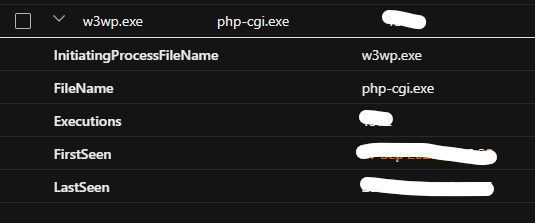
When I ran this in my own environment, the top row was w3wp.exe → php-cgi.exe, with a high execution count and a wide FirstSeen–LastSeen spread. That looked normal for IIS with FastCGI: the IIS worker process (w3wp.exe) hands PHP requests to php-cgi.exe.
Seeing it here confirms two things:
The sensor is capturing this process chain, which gives me a baseline for spotting unusual child processes.
php-cgi.exeitself is not the thing to alert on — it runs constantly and legitimately. What you’re watching for isphp-cgi.exespawning something it shouldn’t, likecmd.exeorpowershell.exe, which is the behaviour the Windows process query looks for.
Detection 1: Windows web/PHP process launches a shell or tool Link to heading
This is the core PHP-to-shell signal on Windows. On IIS with PHP, the process chain may look like w3wp.exe → php-cgi.exe → cmd.exe. This query looks for the final step: a web server or PHP-related process launching a command interpreter, download utility, discovery tool, or another potentially suspicious Windows utility.
It also catches cases where a web server process launches a suspicious child directly, without php-cgi.exe appearing as an intermediate process.
DownloadIndicator is a prioritisation hint. It flags command lines containing URL strings or common download-related terms. A true result does not prove that a download succeeded, and a false result does not mean the activity is safe.
let WebServers = dynamic(['win-web-01', 'win-web-02']);
let WebParents = dynamic(['w3wp.exe','php-cgi.exe','php-win.exe','httpd.exe','apache.exe','nginx.exe']);
let SuspiciousChildren = dynamic(['cmd.exe','powershell.exe','pwsh.exe','curl.exe','certutil.exe','bitsadmin.exe','whoami.exe','net.exe','net1.exe','nltest.exe','systeminfo.exe','mshta.exe','rundll32.exe','regsvr32.exe','wscript.exe','cscript.exe']);
DeviceProcessEvents
| where Timestamp > ago(7d)
| where DeviceName has_any (WebServers)
| where InitiatingProcessFileName in~ (WebParents)
| where FileName in~ (SuspiciousChildren)
| extend DownloadIndicator = ProcessCommandLine has_any ('http://', 'https://', 'Invoke-WebRequest', 'DownloadString', 'DownloadFile', 'Net.WebClient', '-urlcache', 'bitsadmin')
| project Timestamp, DeviceName, DeviceId, ReportId, InitiatingProcessFileName, InitiatingProcessCommandLine, InitiatingProcessAccountName, FileName, ProcessCommandLine, AccountName, DownloadIndicator
| order by DownloadIndicator desc, Timestamp desc
Query Explanation Link to heading
The query first limits results to the specified Windows web servers. It then looks for a listed web/PHP process launching a child such as cmd.exe, PowerShell, curl.exe, or a discovery utility. These tools can be used legitimately, so the parent-child relationship and server context matter.
DownloadIndicator puts command lines containing URLs or common download-related terms near the top of the results. It does not confirm a connection or a successful download. DeviceId and ReportId can be used to pivot to the event in Defender; the command lines and account fields provide investigation context.
One limitation: this query checks the immediate initiating process. It will not automatically match every step of a longer chain such as w3wp.exe → php-cgi.exe → cmd.exe; it can match the final step when php-cgi.exe is the process that launches cmd.exe.
I would start by reviewing InitiatingProcessCommandLine and ProcessCommandLine to understand what launched the child process and what command it ran. I would then inspect the process tree to confirm whether that relationship is expected for the application or server.
Next, I would check InitiatingProcessAccountName and AccountName, including whether the process ran under an application-pool identity or service account. I would pivot to nearby process, file and network events on the same device, looking for related URLs, file paths, hashes or outbound connections. Based on that context, I would decide whether the activity is legitimate, suspicious or confirmed malicious before taking containment action.
Tuning: Baseline normal behaviour first. Exclude known maintenance activity only with narrow conditions such as the expected parent process plus a specific command line or path. Avoid excluding an entire parent process, such as w3wp.exe or php-cgi.exe, because that could hide the behaviour this detection is intended to find.
This is a process-based hunting query, not a detection for a particular PHP CVE. It may miss activity involving unlisted parent or child processes, renamed binaries, or webshells that read files or access data without spawning a child process. Combine it with web-server logs, WAF telemetry, file-write detections and vulnerability management for broader coverage.
Detection 2: Linux web/PHP process launches a shell or download tool Link to heading
Apache, Nginx, LiteSpeed, or PHP-FPM should not be starting sh, bash, curl, wget, or interpreters. PHP’s system() commonly results in a shell such as sh -c <command>, so the shell may be the first child process visible in Defender telemetry.
This applies the same idea on Linux, but the process names and exclusion are different. Linux process names usually do not have a .exe extension, and PHP-FPM workers can have versioned names such as php-fpm8.2.
let WebServers = dynamic(['lnx-web-01', 'lnx-web-02']);
let WebParents = dynamic(['apache2','httpd','nginx','php-cgi','lsphp','litespeed']);
let SuspiciousChildren = dynamic(['sh','bash','dash','zsh','curl','wget','nc','ncat','socat','perl','whoami','id','uname']);
DeviceProcessEvents
| where Timestamp > ago(7d)
| where DeviceName has_any (WebServers)
| where InitiatingProcessFileName in~ (WebParents) or InitiatingProcessFileName startswith 'php-fpm'
| where FileName in~ (SuspiciousChildren) or FileName startswith 'python'
| where not(ProcessCommandLine has '/usr/sbin/sendmail -t')
| extend DownloadIndicator = ProcessCommandLine has_any ('http://', 'https://', 'curl ', 'wget ')
| project Timestamp, DeviceName, DeviceId, ReportId, InitiatingProcessFileName, InitiatingProcessCommandLine, InitiatingProcessAccountName, FileName, ProcessCommandLine, DownloadIndicator
| order by DownloadIndicator desc, Timestamp desc
Query Explanation Link to heading
The query looks for Linux web/PHP processes launching shells, download utilities, discovery commands or Python. The startswith 'php-fpm' condition also matches versioned names such as php-fpm8.2. It excludes command lines containing /usr/sbin/sendmail -t, which can appear in normal PHP mail activity. That exclusion should be validated in the target environment rather than treating every matching event as safe.
DownloadIndicator highlights command lines containing URLs, curl or wget . It helps prioritise results but does not prove that a download succeeded.
I would review the parent and child command lines, the service account, and the process tree to understand why the web/PHP process launched the child. I would then check nearby file and network events. On Linux, I would pay particular attention to unexpected shells, reverse-connection utilities such as nc, ncat or socat, reconnaissance commands, and unexpected interpreter execution.
Note: PHP’s mail() legitimately runs sh -c /usr/sbin/sendmail -t -i on many systems, so the query excludes command lines containing that text. Keep exclusions narrow: an attacker may be able to reproduce the same text, and the exclusion alone should not be treated as a security boundary.
Detection 3: Web/PHP process writes a PHP file Link to heading
This detection looks for PHP-related files created, modified, or renamed by a web/PHP process. It targets the file-drop stage: an attacker may upload a webshell or write a PHP payload to a web-accessible location, then request it over HTTP.
The query covers both Windows and Linux process names in one hunt, but its effectiveness depends on Defender collecting the relevant file events and on the parent process being represented as expected.
let WebServers = dynamic(['web-srv-01', 'web-srv-02']);
let WebProcs = dynamic(['w3wp.exe','php-cgi.exe','php-win.exe','httpd.exe','apache.exe','nginx.exe','apache2','httpd','nginx','php-cgi','lsphp','litespeed']);
DeviceFileEvents
| where Timestamp > ago(7d)
| where DeviceName has_any (WebServers)
| where ActionType in ('FileCreated', 'FileModified', 'FileRenamed')
| where InitiatingProcessFileName in~ (WebProcs) or InitiatingProcessFileName startswith 'php-fpm'
| where FileName matches regex @'(?i)\.(php[0-9]?|phtml|phar)$'
| extend UserWritablePath = FolderPath has_any ('upload', 'uploads', 'images', 'media', 'files', 'tmp', 'temp')
| project Timestamp, DeviceName, DeviceId, ReportId, FolderPath, FileName, ActionType, UserWritablePath, InitiatingProcessFileName, InitiatingProcessCommandLine, InitiatingProcessAccountName
| order by UserWritablePath desc, Timestamp desc
Query Explanation Link to heading
The query uses DeviceFileEvents to find PHP-related files created, modified or renamed by a web/PHP process. The extension filter includes .php, .php followed by one digit, .phtml and .phar. UserWritablePath highlights paths containing terms such as uploads, images, media, tmp or temp. This is only a rough clue: it does not prove that the directory is writable or that the file is malicious.
I would first check FolderPath, FileName and ActionType, then review the initiating process, its command line and the account that wrote the file. I would check whether the file is expected for the application and look for related web requests or suspicious process execution around the same time.
I would prioritise rows where UserWritablePath is true, especially if the file appears in a user-uploaded content directory. I would not assume that every PHP file in such a directory is executable; I would confirm the web-server configuration and application behaviour.
CMS updates, deployment tooling, Composer, and frameworks can legitimately write PHP files. Baseline first, then use narrow exclusions based on known paths and expected processes. Do not exclude all PHP writes from a web server.
Detection 4: Web/PHP process drops a script or executable Link to heading
This detection looks for a web/PHP process creating or renaming a file with an executable, library, or script extension. It targets possible staging activity after initial command execution, when an attacker may place a payload or supporting tool on the server.
This query looks beyond PHP-related extensions for other file types that may be used to run code or load additional functionality.
let WebServers = dynamic(['web-srv-01', 'web-srv-02']);
let WebProcs = dynamic(['w3wp.exe','php-cgi.exe','php-win.exe','httpd.exe','apache.exe','nginx.exe','apache2','httpd','nginx','php-cgi','lsphp','litespeed']);
DeviceFileEvents
| where Timestamp > ago(7d)
| where DeviceName has_any (WebServers)
| where ActionType in ('FileCreated', 'FileRenamed')
| where InitiatingProcessFileName in~ (WebProcs) or InitiatingProcessFileName startswith 'php-fpm'
| where FileName matches regex @'(?i)\.(exe|dll|ps1|bat|cmd|vbs|hta|sh|pl|py|so)$'
| project Timestamp, DeviceName, DeviceId, ReportId, FolderPath, FileName, SHA256, InitiatingProcessFileName, InitiatingProcessCommandLine, InitiatingProcessAccountName
| order by Timestamp desc
Query Explanation Link to heading
This query looks for file types that could be used to run code or load additional functionality, including executables, libraries, shell scripts and Python files. It checks file creation and rename events and includes SHA256 for correlation with other events or reputation sources when a hash is available. A file extension alone does not establish whether a file is malicious.
I would check the full file path, SHA256 hash, initiating process and account. Where applicable, I would validate the file’s origin and signature, then pivot to process execution and network events involving the same device or file. I would use the surrounding activity to decide whether the file is expected or needs further investigation.
To finetuning, baseline legitimate deployment and update workflows. Focus on unexpected file types and locations, and use narrow exceptions for known-good activity rather than excluding a whole web-server process.
Find PHP installations on internet-facing devices(Not detection rule but hunting query) Link to heading
This query shifts from behaviour to asset discovery. It uses Defender Vulnerability Management software inventory to find software whose name contains php, then joins the latest available DeviceInfo record per device to add the IsInternetFacing value.
Use this output to prioritise the behavioural detections: a PHP installation on an internet-facing server may deserve earlier review than the same software on an isolated development machine. Internet-facing status is a prioritisation factor, not proof that the server is vulnerable or directly reachable from every network.
DeviceTvmSoftwareInventory
| where SoftwareName contains 'php'
| join kind=leftouter (
    DeviceInfo
    | summarize arg_max(Timestamp, *) by DeviceId
    | project DeviceId, IsInternetFacing
  ) on DeviceId
| project DeviceName, OSPlatform, SoftwareName, SoftwareVersion, IsInternetFacing
| order by IsInternetFacing desc, DeviceName asc
Thanks to Priyank for guidance in this query…
I would use SoftwareName and SoftwareVersion to identify the PHP installations Defender reports. I would then check IsInternetFacing to help prioritise which devices to review first.
If the internet-facing value is empty, I would check whether a matching DeviceInfo record is available rather than assuming the device is not exposed. The query uses a leftouter join to retain inventory rows even when there is no matching device-info record, and arg_max(Timestamp, *) by DeviceId selects the latest available record for each device.
Limitations: Inventory depends on Defender’s discovery and reporting. A software name containing php may not capture every deployment or bundled runtime, and the internet-facing flag should be validated against your actual network exposure and asset records.
Find high and critical PHP vulnerabilities(Not detection rule but hunting query) Link to heading
This query looks for PHP entries in Defender Vulnerability Management’s software-vulnerability data and retains findings rated High or Critical. It then groups the results by device, operating system, software name, and version, counting distinct CVEs and collecting up to 20 CVE IDs for each group.
DeviceTvmSoftwareVulnerabilities
| where SoftwareName contains 'php'
| where VulnerabilitySeverityLevel in ('Critical', 'High')
| summarize CveCount = dcount(CveId), CVEs = make_set(CveId, 20) by DeviceName, OSPlatform, SoftwareName, SoftwareVersion
| order by CveCount desc
I would start with devices showing the highest CveCount, then review the listed CVEs and the affected PHP software version. dcount(CveId) counts distinct CVEs for each device/software/version group, while make_set(CveId, 20) returns up to 20 CVE IDs, so I would not treat that list as exhaustive when a group has more than 20 findings.
I would compare these results with first hunting query and prioritise internet-facing systems where appropriate. Before recommending a patch, I would confirm the affected version and check the vendor advisory, since inventory can lag and applicability may depend on packaging, backported fixes or how PHP was installed.
Test in a lab, not production. Drop a one-line script in a test web root, for example <?php system('whoami'); ?>, and browse to it. The file-write query should return the file event, while the relevant Windows or Linux process query should return the child-process activity. If neither fires, check sensor health before assuming the server is clean.
Tune by parent + command line, not by whole process. Excluding php-fpm or w3wp.exe entirely defeats the point.
IMP MDE sees processes, files, and network activity — not HTTP requests or PHP source. A webshell that only reads files or dumps a database without spawning a process won’t trigger the process detections. Web server logs, a WAF, and file integrity monitoring fill that gap.
Hardening that makes these detections quieter and the attacker’s life harder:
- Set
disable_functionsinphp.iniforsystem,exec,shell_exec,passthru,popen, andproc_openif the application doesn’t need them. - Block PHP execution in uploads and media directories at the web server level.
- Run PHP under a dedicated low-privilege account with a restrictive
open_basedir. - Keep PHP patched and on a supported version.
A web-facing process starting a shell, writing PHP into a folder it shouldn’t, or dropping executables is a high-signal pattern — and Defender for Endpoint gives you that telemetry on both Windows and Linux. Baseline first, tune narrowly, and alert on the rest.
I’m sharing these queries as a practical starting point for detection engineering, not as a plug-and-play rule for every environment. Please test them in a lab, validate the telemetry available in your Defender environment, and tune against normal application behaviour before creating production alerts.
Suggestions and improvements are welcome. If you’ve tested these detections, found a useful improvement, or spotted an edge case, feel free to share your feedback.
References Link to heading
- Kusto Query Language (KQL) documentation – Microsoft Learn
- PHP Official Website
- PHP2Shell: PHP RCE – Wiz
- Understanding PHP2Shell: Everything You Need to Know – Akamai
- PHP2Shell: Critical PHP Vulnerabilities Enable Unauthenticated Remote Code Execution – Arctic Wolf
- Obstacles to Weaponizing PHP2Shell Likely Constrain Exploitation – CrowdStrike
- PHP2Shell – Wikipedia